

Here at Nava Labs, we run an agentic Form-Filling Assistant that drives a real browser through public-benefits applications. It reads participant data from an external API, opens a remote Chrome instance on Kernel.sh, fills out a multi-step government form, and stops just short of submitting it.
We built it on the Vercel AI SDK with a hand-rolled agent loop: streamText with stopWhen: [stepCountIs(500)], a custom context compressor, a 900-line composed system prompt, and a readReference tool for pulling in documentation on demand.
We swapped that hand-rolled setup for Vercel’s Eve, a pre-built agent harness, without changing what the prompt was achieving. The result: costs dropped anywhere from 44% to 85%, depending on the application and model, with fewer errors and faster runs along the way. Here’s what a harness actually is, what ours was missing, and what the numbers looked like once we made the switch.
What is a harness in an AI application, and why is it useful?
A harness is the core of an AI application. Think of it as scaffolding that wraps around a raw model and turns it into something that can actually get work done, not just answer questions in a chat box. It takes in a request and routes it through the right tools to complete it: running code or browsing files, keeping track of memory and context over a long task, sandboxing risky actions, pausing for human approval, and handling retries and logging along the way.
A handful of pre-built harnesses already do this well — Claude Code, Codex, Cursor, and Vercel’s Eve among them. We picked Eve to test against our own hand-rolled setup, and here’s what changed.
What we saw with a harness vs. without one
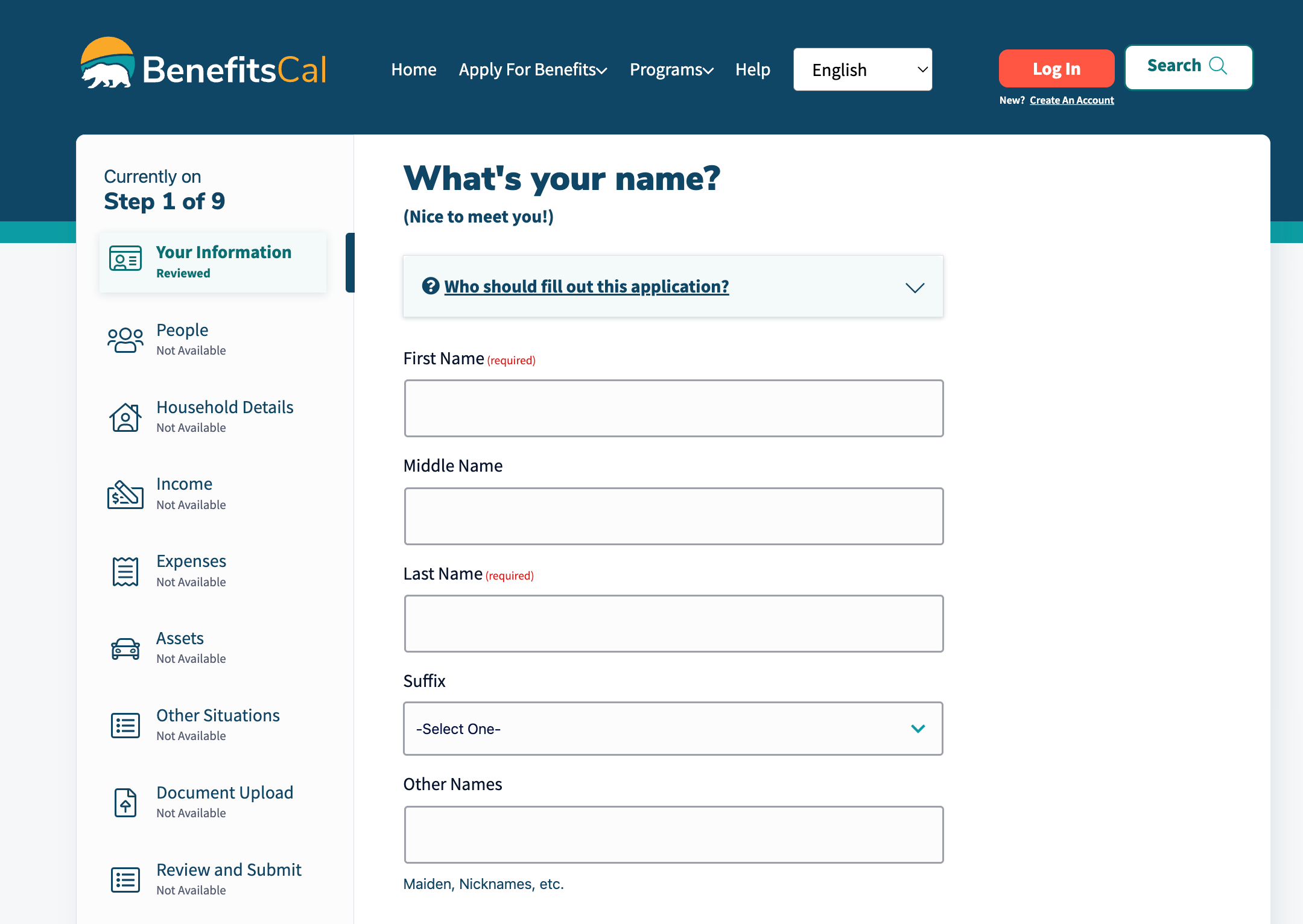
To see this play out, here’s what happened when we tested against real-world benefit applications — BenefitsCal, as one example: a large, multi-page SNAP benefits form — with a harness and without one.
Before Eve
The Form-Filling Assistant started with a single prompt to manage the agent; it grew past 900 lines as we ran into more types of forms it needed to handle. The prompt was very case-specific, tailored to make sure the benefit applications in Riverside, CA could be completed seamlessly. However, we could only reliably handle three applications, and even those only ran error-free most of the time.
On top of that prompt, we built a custom set of tools, memory storage, and compaction, and tested each skill individually to try to make the agent more reliable. It got messy fast: as the prompt grew, it got harder to predict what would break, or when. We also leaned heavily on Opus 4.7, which was expensive, and every model update risked breaking the prompt.
Why we added Eve
We brought in Vercel’s Eve harness to target three problems directly:
Memory storage and compaction
The ability to switch to less expensive models
Error handling and testing
After Eve
The clearest change showed up in the bill, but it started with a structural fix: we no longer have to manually wire together skills, tools, and the main prompt — Eve handles that connection natively.
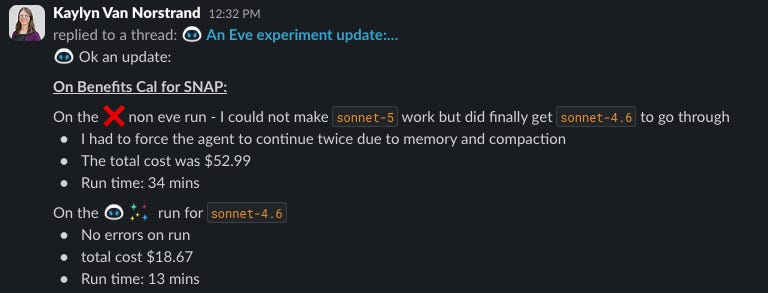
Cost dropped substantially. Smaller applications that used to run up to $5 now cost about $2. Larger applications, like BenefitsCal, went from roughly $50 down to $18.
Run time dropped too. On our largest applications, run time went from 34 minutes down to 13.
Memory got seamless. Built-in memory worked reliably and didn’t lose data mid-run. That held true for compaction too — Eve doesn’t need a custom compaction implementation, so the agent moves through memory and compaction without issue. Without it, we regularly saw applications stall or error out at exactly that step.
Skills became reusable. The agent reads skill files as needed instead of loading every skill into the first prompt. We used to struggle to manage skills effectively; with Eve, the agent pulls in each skill only when it’s appropriate. On our longest application, I ran it multiple times with Eve and it completed every time. The same application on our original, non-Eve prompt kept erroring out.
Modals stopped being a bottleneck. We used to get stuck on modals often — Eve moves through them cleanly, mostly because it knows when to call the right skill or tool.
The BenefitsCal numbers
Without Eve, we couldn’t get Sonnet 5 to complete a run at all — we had to fall back to Sonnet 4.6, and even then needed two forced continues to get past memory and compaction, at a cost of $52.99 and a runtime of 34 minutes. With Eve, that same Sonnet 4.6 run completed with no errors, at $18.67 and 13 minutes.
Smaller applications: the cost
BenefitsCal is one of our largest applications, so we also wanted to check whether the cost savings held up on smaller ones, across multiple models, before committing further to harness testing.
WIC (Women, Infants, and Children) — the smallest application we support:
gpt-5.4-mini: $0.13 without Eve → $0.02 with Eve (about an 85% reduction)Sonnet 4.6: $2.76 without Eve → $1.10 with Eve (about a 60% reduction)Opus 4.8: $3.40 without Eve → $1.90 with Eve (about a 44% reduction)Haiku 4.5: $0.62 without Eve → $0.25 with Eve (about a 60% reduction)
WIC was the easiest application we tested — no errors, and no need for the memory tools — but the cost reduction held up across every model we tried.
IHSS (In-Home Supportive Services) — a one-page application, but an older one:
Sonnet 5: $5.39 without Eve → $2.40 with Eve (about a 55% reduction)Haiku 4.5: $2.10 without Eve → $0.95 with Eve (about a 55% reduction) — though both runs completed with errors, not cleanly
Haiku’s IHSS result comes with a caveat worth calling out: with or without Eve, it couldn’t fill in masked or numbered fields — state, SSN, birthdate, phone number — so that specific gap looks like a model limitation, not a harness one. Eve still helped elsewhere on that same run: without it, Haiku also missed an entire “check any that apply” section and left Submit enabled despite the missing fields; with Eve, neither of those additional issues showed up. Sonnet 5 didn’t have this problem at all — with Eve, it took longer to analyze the page but filled out every field correctly, masked ones included.
What this could unlock for us
Eve took away a lot of the pain we hit while building the application. We spent a lot of time just refining the agent to handle our three main applications reliably. With Eve handling those core pain points, we can put more of that time into the user experience instead.
A few directions we’re now considering:
Multi-form applications
Audio AI interaction
A possible Chrome extension
Moving away from a chat-based interface
Also on our radar: Vercel’s AI SDK now has a HarnessAgent API that lets you swap between harnesses the same way you’d swap between models — write the agent once, and change the harness underneath it later. Still early, but worth testing.
The takeaways
Overall, a harness has proven to be the right way to build an AI application. Working with an AI model is powerful, but without a good harness, it comes with unexpected issues and flaws that are hard to predict — that’s just the nature of LLMs.
Once we let Eve take over the parts we’d been hand-rolling ourselves, the same models did the same work for 44% to 85% less, with fewer errors and faster runs. For an agentic application running at any real scale, that’s not a marginal win — it’s the difference between a project that’s worth scaling and one that quietly bleeds budget.